





Why should you add an Order Delivery Date to your WooCommerce checkout?

One of the most common questions customers ask after placing an order is “Where is my order?” and this happens when the shipping expectations aren’t clear. Giving shoppers the option to select a delivery date at checkout solves this problem right at the start.
Delivery dates are essential for store owners in multiple ways other than their convenience. Actually, these dates enable you to organize your production capacity, oversee staff scheduling and, what is even more important, confirm that orders that you have been packed and shipped on the delivery date. In this way, all this makes your business become more normal and less hectic.
Providing delivery time slots and blackout dates allows them to decide what is the most convenient for their schedule, be it home delivery or store pickup. It is just a small improvement that can really make a difference in the trust building and conversion rate.
Methods to easily add a WooCommerce order delivery date (choose your path)
Adding delivery dates to WooCommerce isn’t complicated. You have two distinct ways to do it: One is a fast and plugin-driven, the other is manual with code. The decision of which route to take depends on whether you want to be faster or have more control.
- Method 1: Using a delivery-date plugin
This is by far the fastest way to set things up. An order delivery-date plugin usually comes with ready-made features like date pickers, time slots, blackout dates for holidays, same-day or next-day restrictions, and even cutoff times for placing an order. After you have installed the WooCommerce delivery date plugin, just customize it according to the requirements of your shop-no coding, no adjustments.
It’s quick, flexible, and built for store owners who want results without touching code.
- Method 2: Add a custom checkout field
In case you are willing to build the custom field on your own, WooCommerce will be able to let you generate a date picker field at the checkout page. Hence, you can have complete control over the development as you are the one who defines the look, place, and function of the field.
The technical path is more time-consuming, however, it is a lightweight, free, and very customizable solution which enables you to adapt the checkout flow to your online store in the best possible way.
Let’s now understand each of these methods in detail!
Method 1: Adding a delivery date in WooCommerce Checkout using a plugin.
Installing a plugin is the most efficient method to include a delivery date in the WooCommerce checkout process. It takes care of the entire process of date selection, time slots, and blackout dates, and with just a few clicks, you can set the preferences to match the store’s flow of work.
Let’s look at the plugins you could choose from!
1. Order Delivery Date for WooCommerce:
Order Delivery for WooCommerce lets your customers pick exactly when they want their orders to be delivered, right at checkout. So, instead of customers having to call the store to know the delivery dates, both you and your customers get clear delivery timelines, reducing mistakes and missed deliveries.
This WooCommerce order delivery plugin gives you fine control over your delivery schedule. You can define blackout days, set minimum preparation times, and restrict how many orders you accept per day or per time slot.
For instance, in case your policy states that delivery is to be made in 7 days, customers will not be allowed via the plugin to select delivery dates earlier than 7 days from their order placing date.
In addition to that, the plugin can be used to provide local pickup or a delivery on the same day with predetermined time slots, letting your store have different fulfillment methods for various deliveries. Moreover, if it is required, you may link the certain days or time slots with extra delivery charges.
If you require more features for your plugin with custom functionality, then the proficiency of our team in WooCommerce custom development could be just the solution to meet your store’s specific needs.
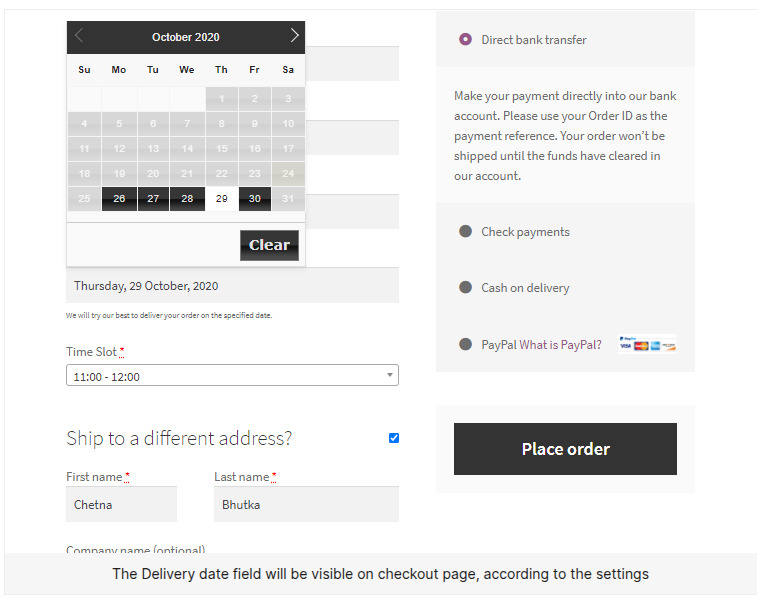
Key Features of Order Delivery Date for WooCommerce:
- Delivery Date & Time Selection: Let your customers decide the exact time that they want their order delivered right at the checkout. As an illustration, if someone shops for a birthday present, then getting the date and a suitable time slot so that the gift is delivered fresh and on time would be the perfect choice.
- Delivery Capacity Control: You have the option to set the maximum number of orders that can be delivered either daily or in a specific time slot. For example, if you can only take 10 delivery orders in the morning, the plugin will stop extra orders from being placed in that particular slot.
- Flexible Scheduling Rules: Besides setting lead times, blackout dates, and cutoff times, the Order Delivery Date for WooCommerce also allows you to decide which delivery dates your customers will be able to choose so that your schedule does not get too crowded.
- Flexible Delivery Options: Order Delivery Date for WooCommerce allows you to offer both local pickup and same-day delivery slots. This gives customers flexibility while helping you manage different fulfillment methods easily.
- Extra Delivery Fees: You can also add extra charges for premium days or specific time slots, giving you a way to cover the additional costs of managing those deliveries.
Pricing: Order Delivery Date for WooCommerce is available in a free version, and the premium version starts at $149 per year.
Looking to add something more unique for your WooCommerce store in terms of adding an order delivery date?
Our expert team can bring them to life with professional WooCommerce development services.
Tell us your requirements today!2. YITH WooCommerce Delivery Date
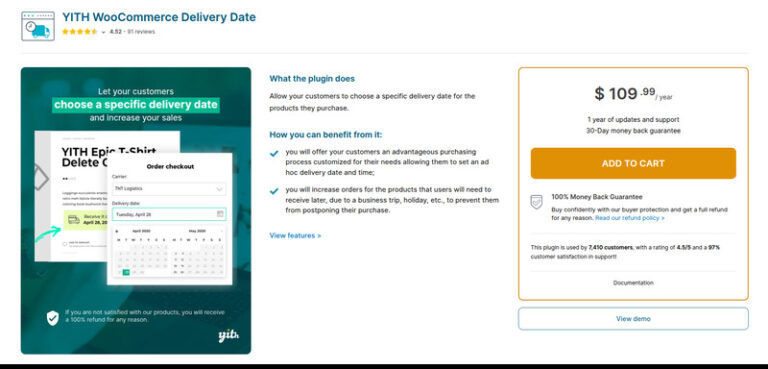
YITH WooCommerce Delivery Date allows your customers to determine the time of delivery of their orders. Delivery is no longer a matter of luck, but the buyers can choose a convenient date and time slot at the checkout, thereby adding not only convenience for themselves but also transparency for you.
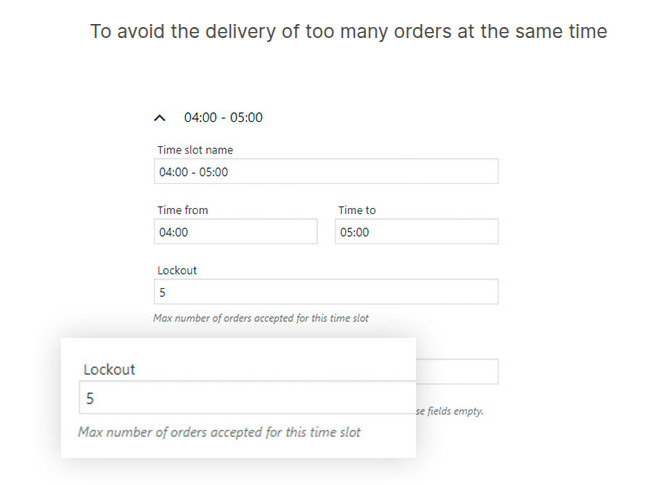
The plugin facilitates order limitation by allowing the setting of a maximum number of orders for each delivery time. Thus, if the first five orders are scheduled for the morning, the system will close the window for the next one automatically.
Plus, this WooCommerce delivery date plugin also adapts to different carriers or shipping services. You can assign specific days and time slots to certain shipping methods, making your logistics smoother.
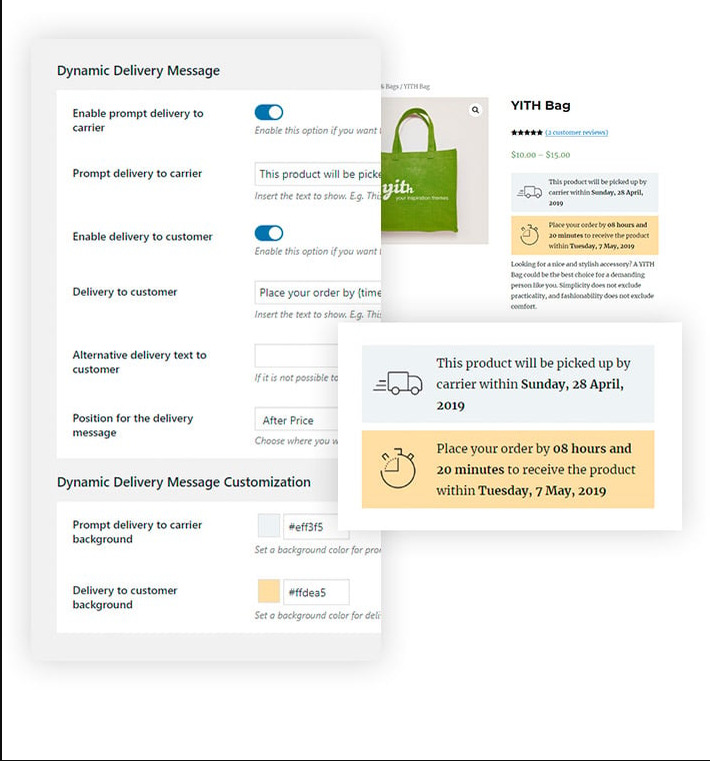
Finally, you can display dynamic delivery messages, so customers see accurate information about their chosen slot. A built-in calendar view makes the whole selection process simple and transparent.
Key Features of YITH WooCommerce Delivery Date:
- Limit Orders per Slot: Using this plugin, you can restrict how many orders are delivered during a particular time period so that the delivery service is not overloaded. In this way, you will be certain that you did not take on more work than you can handle in a specific period of time.
- Dynamic Delivery Messages: You may display instant delivery notices for the time slot selected by the customer, so they are always informed of the delivery time, leading to fewer inquiries.
- Calendar View: This WooCommerce delivery date plugin provides a visual calendar that helps customers easily see which dates are available. They can quickly pick a convenient day without guessing or calling.
- Flexible Scheduling Rules: YITH WooCommerce Delivery Date also allows you to block holidays, set lead times, or define cutoff times to match your store’s workflow. For example, if orders need 3 days to prepare, only dates 3 days later or beyond will be selectable.
- Carrier-Specific Slots: The plugin lets you assign specific days or time windows to different shipping methods. For instance, express shipping can have morning slots while standard shipping uses afternoons.
Pricing: There is no free version of the YITH WooCommerce Delivery Date plugin available. The premium version is $109.99/year, which covers 1 year of updates and support and also comes with a 30-day money-back guarantee.
3. Delivery Time Slots for WooCommerce
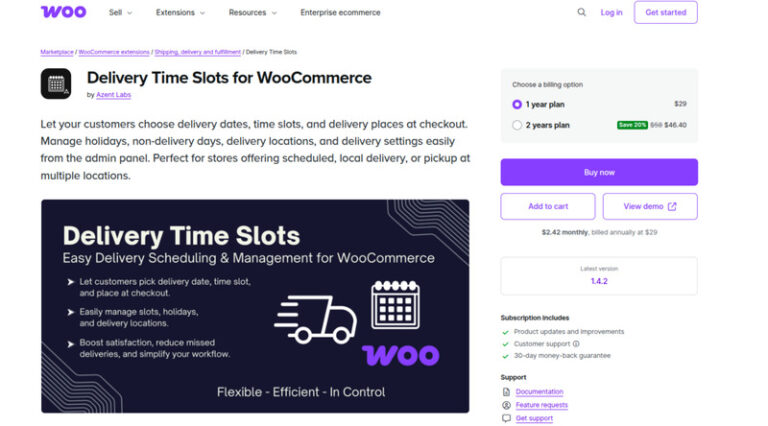
The WooCommerce Delivery Time Slots not only enables customers to select the delivery date as well as the exact time slots at checkout, but also provides several time slots per day, thus allowing you to distribute the deliveries over morning, afternoon, and evening time slots to handle the high volume in the efficient way.
The plugin also accommodates delivery or pickup locations, allowing users the option of a home delivery or collection from a nearby point, which adds convenience for both local and multi-location stores.
Lastly, this WooCommerce delivery date plugin gives the ease of admin slot control, allowing you to block holidays, limit days when there is no delivery, as well as supervise slots that are available quickly without complicated settings.
Key Features of Delivery Time Slots for WooCommerce:
- Multiple Time Slots per Day: The WooCommerce Delivery Time Slots offer you several delivery windows to spread out orders efficiently. For example, provide morning, afternoon, and evening slots to reduce delivery congestion.
- Delivery or Pickup Locations: The plugin allows your customers to select a location for delivery or a pickup point if there is more than one location or local pickups available.
- Admin Slot Management: With the help of this WooCommerce delivery date plugin, the user can decide which slots are to be made available, close off holidays, and take care of non-delivery days so that the delivery schedule is up to the store’s capacity.
- Date & Time Selection: Once configured, the plugin lets your customers pick the delivery date and preferred time slot at checkout, giving them full control over when they receive their orders.
Pricing: The WooCommerce Delivery Time Slots is a premium plugin and starts at $29/year with full access to updates, support, and a 30-day money-back-guarantee.
Method 2: Adding a delivery date in WooCommerce Checkout with code (without using a plugin)
In case you are not willing to add an extra plugin just for the delivery date, then the best solution is creating a delivery date through WooCommerce custom checkout fields. This way, you keep your site lightweight and fast, have complete control over the field appearance, validation, and display in orders and emails, and do not get any additional features that you do not need but that require a small change in your theme’s functions.php file (or a custom plugin file).
For better understanding, each snippet of the below steps is shown separately. In a real setup, all the code would be combined in the same file (either your theme’s functions.php or a small custom plugin file) to add a WooCommerce order delivery date correctly. The steps below are to show the method; you can use them to add a WooCommerce order delivery date.
Step 1: Add the Delivery Date Field to Checkout:
Use the woocommerce_checkout_fields hook to create a new “Delivery Date” field at checkout.
|
1 2 3 4 5 6 7 8 9 10 11 |
add_filter('woocommerce_checkout_fields', 'add_delivery_date_checkout_field'); function add_delivery_date_checkout_field($fields) { $fields['billing']['delivery_date'] = array( 'type' => 'text', 'label' => 'Delivery Date', 'required' => true, 'class' => array('form-row-wide'), 'placeholder' => 'Select a date', ); return $fields; } |
- Customers will see a text input.
- Optionally, you can turn it into a calendar pop-up with jQuery UI’s date picker for easier selection.
Step 2: Validate the Field:
Use woocommerce_checkout_process to make sure customers don’t skip the delivery date.
|
1 2 3 4 5 6 |
add_action('woocommerce_checkout_process', 'validate_delivery_date_field'); function validate_delivery_date_field() { if ( empty($_POST['delivery_date']) ) { wc_add_notice( 'Please select a delivery date.', 'error' ); } } |
- The system will check that a date is selected before the order can be placed.
- If a customer tries to check out without a date, they’ll see an error message prompting them to pick one.
Step 3: Save the Delivery Date in Order Meta
Use woocommerce_checkout_update_order_meta to save the chosen date with the order.
|
1 2 3 4 5 6 |
add_action('woocommerce_checkout_update_order_meta', 'save_delivery_date_order_meta'); function save_delivery_date_order_meta($order_id) { if (!empty($_POST['delivery_date'])) { update_post_meta($order_id, 'Delivery Date', sanitize_text_field($_POST['delivery_date'])); } } |
- This way, the delivery date is stored and associated with that specific order.
Step 4: Display the Date in the Admin Panel
Use woocommerce_admin_order_data_after_billing_address to show the delivery date in the WooCommerce order dashboard.
|
1 2 3 4 5 6 7 |
add_action('woocommerce_admin_order_data_after_billing_address','display_delivery_date_admin_order', 10, 1); function display_delivery_date_admin_order($order){ $delivery_date = get_post_meta($order->get_id(), 'Delivery Date', true); if ($delivery_date) { echo '<p><strong>Delivery Date:</strong> ' . esc_html($delivery_date) . '</p>'; } } |
- You, as a site owner, can quickly see the delivery date alongside billing and shipping information.
Step 5: Show the Delivery Date in Emails
Use woocommerce_email_order_meta to include the delivery date in customer and admin emails.
|
1 2 3 4 5 6 7 |
add_action('woocommerce_email_order_meta', 'add_delivery_date_to_emails', 10, 3); function add_delivery_date_to_emails($order, $sent_to_admin, $plain_text){ $delivery_date = get_post_meta($order->get_id(), 'Delivery Date', true); if ($delivery_date) { echo '<p><strong>Delivery Date:</strong> ' . esc_html($delivery_date) . '</p>'; } } |
- This ensures both your team and the customer are on the same page about the expected delivery date.
Optional: Add a Calendar Date picker
For a better user experience, you can load jQuery UI’s date picker, so customers can pick a date instead of typing it:
|
1 2 3 4 5 6 7 8 9 10 11 12 13 14 15 |
add_action('wp_footer', 'load_datepicker_script'); function load_datepicker_script(){ if( is_checkout() ) { ?> <script> jQuery(function($){ $('#delivery_date').datepicker({ dateFormat : 'yy-mm-dd', minDate: 0 }); }); </script> <?php } } |
Wrapping Up - Adding an Order Delivery Date for WooCommerce Checkout
Adding a delivery date to a WooCommerce order can range from a very basic simple option to a highly customizable one depending on your needs. If you’re comfortable with a bit of technical work and know how to handle WooCommerce custom checkout fields for making a WooCommerce order delivery date, then you have absolute control over its look, validation and also, how it interacts with orders and emails. This is very lightweight, free and extremely customizable for any kind of unique store setup.
If you’d rather skip coding, a dedicated delivery date plugin is the quickest and easiest way to add features like time slots, blackout dates, and automatic rules. Either approach helps improve the checkout experience and keeps both your store and customers on the same page.
FAQs about adding the WooCommerce order delivery date at Checkout
Which plugin is best for delivery dates & time slots?
The Order Delivery Date for WooCommerce plugin is the best because it’s easy to set up, feature-rich, and lets customers pick dates and time slots while giving store owners full control.
Can I set separate delivery slots for local pickup and home delivery?
Yes, several plugins like YITH WooCommerce Delivery Date allow different time slots for pickup vs delivery to keep scheduling organized.
What if I get stuck while adding a WooCommerce order delivery date?
Our experienced WooCommerce developers can help you set up custom delivery dates, time slots, and checkout fields quickly and correctly, so you don’t have to worry about technical issues.
Will custom code snippets work with WooCommerce Checkout blocks and modern themes?
Generally, yes, but block-based checkouts may need testing or small adjustments to work properly.