






Are you struggling to find the Perfect Page builder for your Website? You’re not the only one. Thankfully, it is now more than halfway through the custom WordPress site building process without any coding, just with one of the WordPress page builders. The functionality of WordPress page builder plugins has been modernized so each one of them can have a stylish, responsive, and professional look with a drag-and-drop interface design. Whatever it is that you are planning to work on, a blog, a company site, or an online store, page builders for WordPress thoroughly manage the typical visual part with their design and layout options and content management with a visual editor. Many offer free versions of their plugin, and many others have more functional tools for users who sign up for a premium plan.
In this article, we will show you how a few different page builders for WordPress stack up against one another on usability, design flexibility, and optimal performance, so you can choose the right WordPress page builder plugin that’s right for you and your needs.
1. Elementor Page Builder
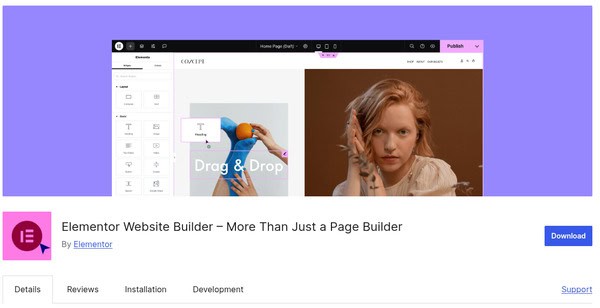
Elementor is a top WordPress page builder plugin that is used on over 5 million websites today. It includes a drag-and-drop visual editor, allowing users to build pixel-perfect designs in WordPress. Users have access to over 300 pre-made blocks that they can use, or they can create new ones entirely by themselves.
Moreover, the Theme Builder feature is also among the features of the Elementor Page Builder, which allows you to create your own headers, footers, single post templates, and WooCommerce templates. Popups, sticky banners, and forms can be generated without any trouble just by the help of the plugin that you already have installed. Basically, the true Elementor Page Builder is the one who is in complete control when it comes to working with the dynamic content (ACF, Toolset, CPTs), providing the advanced features like the animation effects or custom CSS, and giving the easy extensions just like the official and the third-party add-ons.
Salient Features:
- Live Drag-and-Drop Editor: The ability to create and design visually on the page – in real time – with a clean, intuitive interface requiring no coding experience.
- Pre-Made Templates & Blocks: Select from hundreds of sections, full pages, and content widgets that are designed just for you (300+).
- Popup & Form Builder: You can insert popups, lead-gen forms, and CTAs into Elementor without the additional burden of another plugin to install.
- Global Styles & Custom CSS: This page builder controls colors, fonts, and spacing for your entire site, as well as advanced options for adding custom CSS.
- Responsive Controls: You can easily change your regular layout into a mobile version with custom visibility and spacing.
- Add-On Ecosystem and Integrations: At this point, you may extend the functionalities with other plugins or any of the numerous official add-ons and widgets, and make use of dynamic content with ACF and Pods.
- Theme & WooCommerce Builder: Without having to go through each page individually, you can change globally what appears across your site, such as headers, footers, product pages, checkout pages, and much more.
Pros:
- One of the things that will draw the attention of new users to this plugin is that it presents a user-friendly interface and considerable design flexibility.
- It includes a massive template library and a wide selection of widgets to streamline page creation.
- Elementor has an active user community with good support for third-party integrations.
Cons:
- Using too many resources like widgets and animations can slow down your site.
- Most of the advanced features are only in the Pro version, so free users are limited.
Pricing: Elementor Page Builder offers a free version, and the Pro version begins at $59/year for 1 website.
2. Gutenberg Page Builder
Gutenberg is WordPress’s default block editor, not a theme builder by definition, but with Full Site Editing (FSE) and Advanced Custom Fields (ACF), it now plays a key role in theme customization. FSE allows users to visually edit headers, footers, and templates, while ACF brings in dynamic fields and custom block creation.
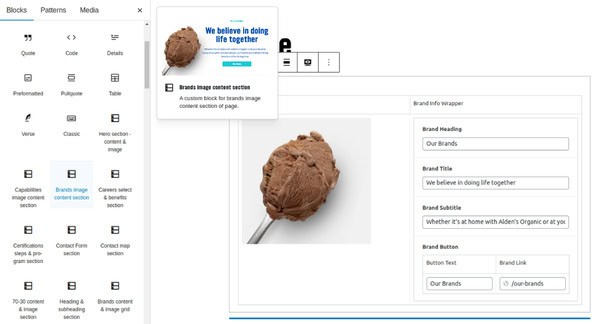
ACF enhances Gutenberg by enabling developers to create dedicated blocks linked to custom fields, depending on the type of elements like text, images, repeaters, etc., via PHP or JSON. You can customize your store with the help of ACF. When done effectively, store owners can still have a well-organized data-structured backend, though they and their users will be free to lay out the front end as they want, with flexibility for both layout and content. In case you require more sophisticated functionality or an authentically personalized theme, then a WordPress custom theme developer is the one to talk with so that you can get the most out of ACF.
Notable Features:
- Custom ACF Blocks & Layouts: You can create your styled dynamic layouts with ACF-powered Gutenberg blocks mapped directly to custom fields and logic, using PHP or JSON.
- Full Site Editing & Global Styles: You can design your entire website with all header files, footer files, all WordPress templates, and control all global typography, colour, and spacing settings.
- Clean & Flexible Backend: ACF’s structured field groups simplify content editing, while Gutenberg ensures a visual editing experience.
- Lightweight & Developer-Friendly: Built into WordPress core for fast performance and supports custom logic via PHP and JSON.
Pros:
- Gutenberg page builder allows for visual editing, and ACF’s structured fields help prevent content editors from messing up your design.
- Fully compatible with WordPress Full Site Editing (FSE), enabling complete control over your site’s templates and layouts using blocks.
- Built into WordPress core, offering faster load times and fewer compatibility issues.
- It supports PHP and JSON for advanced and custom logic.
Cons:
- To fully customize your blocks, you must have an understanding of WordPress theme builder and ACF block registration.
- ACF integration with the latest FSE features is still improving.
Pricing: Gutenberg page builder is completely free in the WordPress core. The pro version of ACF starts from $49/year annually.
Are you looking for custom solutions to expand your WordPress site?
Hire trusted WordPress plugin developers today!3. WPBakery Builder
WPBakery Page Builder is probably the most compatible and popular visual editor for WordPress, with front-end and backend editing capabilities. With its easy-to-use drag and drop builder functionality, and hundreds of built-in content items and elements such as sliders, grids, buttons, etc., it can make building a page simple without coding.
WPBakery Page Builder is also very reliable with most WordPress theme builders and plugins. It’s fully responsive and supports expansion through custom shortcodes and premium add-ons, giving users flexibility without added complexity.

Key Features:
- Drag-and-Drop Editor: The UI will enable you to build or design your page visually or via the dashboard, and you can decide.
- Pre-Built Content Elements and Templates: To speed up the process of building your pages, you have over 50 content elements and reusable templates at your disposal.
- Shortcode Structure & Theme Compatible: WPBakery Page Builder is powered by shortcodes, so it can function together with virtually any WordPress theme and also with any other plugins.
- Extendable with Add-Ons: You can also have many more options, improve your design features and improvements, all with third-party add-ons and custom shortcodes.
Pros:
- A big community and marketplace of allowed extensions and templates.
- WPBakery Page Builder includes both front-end and back-end editing modes.
- Great for non-developers who want to visually create complicated layouts.
Cons:
- The UI is a bit dated compared to new page builders for WordPress, such as Elementor and Gutenberg page builders.
- It uses shortcode-based output, which results in cluttering of the pages if not managed properly.
- WPBakery Page Builder is less flexible in comparison to block editors.
Pricing: WPBakery Page Builder has a Free version and its Pro version begins at $99 per year.
4. Visual Composer Builder
Visual Composer is a contemporary WordPress page builder plugin with a visual drag-and-drop editor. It has a unique tree view panel that gives you control of how you structure your layout. Visual Composer is a great choice when building larger, complex websites that need to be presented in an organized manner. The builder comes with over 300 elements, templates, and blocks for faster design.
Additionally, it also includes a Theme Builder that allows you to design headers, footers, pop-ups, and archives. Visual Composer uses a built-in custom CSS builder, implements JavaScript, has multiple developer hooks, and overall is an excellent direction if you are a freelancer, agency, or developer with plugin experience that wants to create something flexible and free of shortcode clutter.

Salient Features:
- Frontend with Tree View Editor: You can visually build pages or define layout structure with a collapsible, drag-and-drop tree view.
- Theme & Popup Builder: Lets you control headers, footers, archive templates, and create popups without using third-party tools.
- 300+ Elements, Blocks & Templates: Provides you access to the complete library of prebuilt design blocks, layout templates, and content elements.
- Global Design Controls: You can control fonts, colors, spacing, and configurations from one location for your entire site.
- Clean Code Output: Visual Composer creates clean code that will not break if you deactivate Visual Composer.
- Custom Code & Developer Tools: Extend with custom CSS/JS, hooks, and API support for advanced users.
- Theme & Plugin Compatibility: Works with most themes and major plugins to integrate your site smoothly.
Pros:
- Visual Composer has a flexible editor for designers and developers.
- It has a good combination of features and ease of use for editors.
- It features white label options, which are ideal for agencies creating sites for clients.
- The admin role allows you to control who edits what, depending on user roles.
- The regular updates and active support help keep the builder stable and compatible with WordPress.
Cons:
- If the Builder is not optimized properly, then it can slow down your site.
- Importing templates can take a considerable amount of time with inexpensive or basic hosting packages.
- It has comparatively fewer built-in integrations than other existing page builders for WordPress.
Pricing: Visual Composer has a free version, and its Pro version begins at $49/annually.
5. Brizy Page Builder
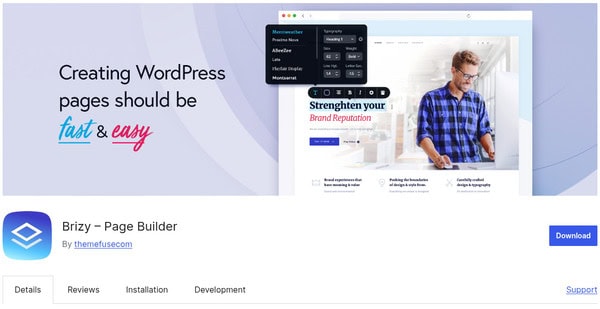
Brizy is a beginner-friendly, fast, and clean WordPress page builder plugin that was built for visual design in real-time. One of the best features of Brizy is its inline editing, which makes updates of content incredibly fast and easy. You can type your content and style it on the page without the need for sidebars or panels. You can drag and drop blocks, resize items, and adjust layouts without any code touching your work.
Brizy also includes 500+ pre-made blocks and templates, global styling, mobile responsiveness controls, and a built-in form and pop-up builder perfect for landing pages and marketing sites. Brizy is essentially either the WordPress plugin or Brizy Cloud (the hosted solution), where you make and launch your site all in one place. A WordPress custom theme development team ought to be the one you turn to whenever you need a theme that is tailored to your liking or want more complex features
Salient Features:
- Inline Drag-and-Drop Editing: Building pages visually with Brizy enables you to easily edit content directly on the page and not just by using a side panel.
- 500+ Layouts & Block Templates: There are also hundreds of design blocks, premade layout kits, and full-page templates to choose from.
- Built In Form & Popup Builder: It has all the functionality to create popups, lead-generation forms, and calls-to-action all in one, and NO additional plugins required.
- Global Styling with Responsive Controls: The global controls put all the fonts, colors, and spacing at your fingertips so that you have one place from which you can handle them.
- White Labeling & Role Management (Pro): The advantage of white labeling is that you can not only customize the branding but also the access levels of users, which is a perfect situation for agencies or client-related work.
Pros:
- Includes pop-up and form builder out of the box without adding any extra plugins.
- Brizy Cloud offers hosted site deployment for users who want to skip WordPress hosting setup.
- White label and user roles let you control features, making it great for client projects.
Cons:
- Some limitations on dynamic content tools, such as ACF and custom post types.
- Brizy has a smaller ecosystem of third-party add-ons and has fewer advanced widgets.
- Not ideal for large or complex websites that require deep backend customization.
Pricing: Brizy has a free version, and its pro version is $60 per year for one site.
Wrapping Up!
Choosing the best WordPress page builder plugin depends on many things, including the purpose of your website, your familiarity with the technology, and your design preferences. Some plugins are very clear about their emphasis on speed and clean code. While some provide a great deal of customization and more freedom in the layout and templates, besides, there are also more integration possibilities with other tools.
If you want to start a simple blog or a business site that converts well, the right builder will let you create better and faster without coding. Therefore, if you are looking for a free, light, and customizable WordPress page builder to suit your working style and final goal, or a professionally developed and feature-rich premium tool, there is a choice.